
Astra - Life Advice
Vert Media PartnersLifestyle
4.4491.00 Reviews
- Version
- 2.5.2
- Installs
- 500.00K
- Age Rating
- Teen
Screenshots
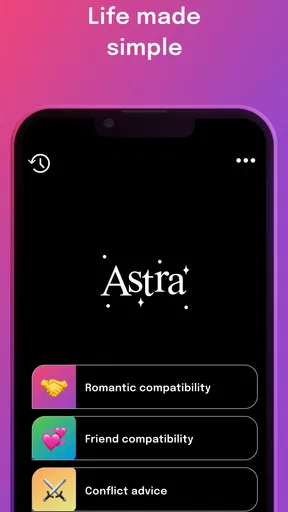
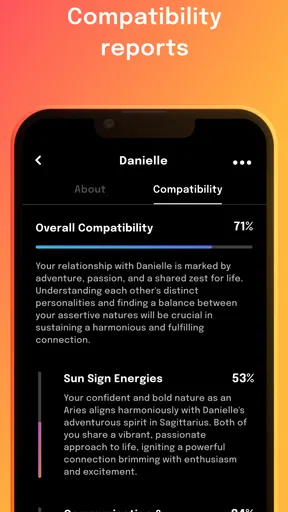
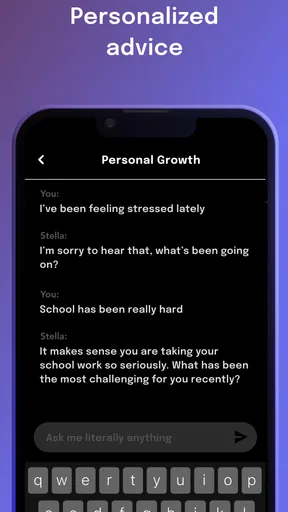
Our Review of Astra - Life Advice
 Analysis by Appyee
Ever find yourself in a bit of a rut, wondering which way to turn next in life? Well, let me tell you about an app that might just be the guiding light you’re looking for. I recently tried out Astra - Life Advice, and it’s a super interesting tool that aims to provide users with personalized advice across various aspects of life, from career choices to personal growth.
Where a connected advice app fits
My first practical question was when I would actually open a lifestyle app like this, rather than reach for a search engine, a notebook, or a conversation with someone I trust. For me, the best fit is a small, specific moment: I have a decision on my mind, want a prompt to organize my thoughts, and have enough time and connectivity to explore the app instead of rushing through it. That makes the experience feel more like a reflective pause than an authority handing down a verdict.
Connectivity matters most when I want to get into the app, review its guidance, or take part in its community. I would avoid starting a meaningful session while walking between appointments or relying on a shaky connection; a distraction or interruption can make reflective advice feel fragmented. If I am heading out, I prefer to read and think through a prompt before leaving, then use a paper note or a saved thought of my own to continue reflecting later. I would not plan around access to any particular feature without checking that it is available when I need it.
A realistic routine might be opening the app during a quiet lunch break after a difficult work conversation. I could use a career prompt to name what bothered me, decide on one question to raise with a manager, and leave the actual decision for a calmer moment. That is a more grounded use than expecting an app to tell me whether to quit a job or settle a personal dispute. The useful result is often a clearer next step, not a complete answer.
First Impressions
When I first downloaded Astra - Life Advice, I was greeted with a sleek and intuitive interface. It feels like the app developers really put some thought into user experience. Everything is neatly categorized, making it easy to navigate through the different sections. I was able to jump right into setting up my profile without any confusion, which is always a plus in my book.
Setting Up and Getting Started
Setting up the app was as easy as pie. You start by answering a series of questions that help the app tailor its advice to your specific needs. The questions cover a broad range of topics, like your current job situation, personal goals, and even a bit about your personality traits. It felt almost like having a mini therapy session, but in a good way!
Because those early answers shape the experience, I would treat setup as something worth doing thoughtfully rather than tapping through while distracted. Give answers that reflect your present circumstances, not the person you hope to become next year. If your work situation or priorities change, it is sensible to revisit how you interpret the guidance instead of assuming that advice based on an old self-description still fits. This is a small but useful distinction: personalization can feel specific while still depending on the details you choose to share.
Once your profile is set up, Astra starts to generate advice and tips that are surprisingly spot-on. I found the guidance to be quite insightful, especially in areas where I was feeling a little lost. The app doesn't just throw generic advice at you; it really feels personalized.
I still use that feeling of relevance as a starting point, not proof that a suggestion is right for me. A prompt can help me notice an option I had overlooked, but it cannot know every detail of a relationship, workplace, or financial situation from a short profile. When the stakes are high, I would compare the advice with practical facts and talk it over with a person who understands the context. That keeps a helpful nudge from turning into an automatic decision.
Features that Stand Out
One of the coolest features of the app is the daily motivational quotes. I know, I know, motivational quotes can sometimes feel a bit cliché, but there’s something about getting a little positive nudge each day that can really set the tone. Plus, the app allows you to save your favorite quotes and even share them with friends, which is a nice touch.
Saving a quote is more useful when I attach it to a real intention. If one catches my attention, I can ask myself what action it points toward, then make that action small enough to do today. Otherwise, a steady stream of inspiration can become pleasant background noise: easy to read, easy to forget. Sharing also works best when the person receiving it would welcome that kind of encouragement; a quote is not a substitute for listening when someone needs a conversation.
Another standout feature is the career advice section. It’s like having a career coach in your pocket. The app offers tailored advice on how to improve your skills and navigate the workplace. There are even interactive exercises that make the whole experience more engaging and less like a boring lecture.
I would use those exercises to prepare for a conversation or clarify a skill I want to develop, rather than treat them as a complete career plan. A useful workflow is to pick one workplace challenge, work through the relevant exercise, and write down a single next step before closing the app. That creates something I can act on without turning a quick session into an endless search for the perfect answer. For decisions involving contracts, pay, or a major career change, advice from someone with direct expertise is the better complement.
Personal Growth and More
Aside from career advice, Astra also focuses on personal growth. There’s a section dedicated to mindfulness and meditation, which I found incredibly helpful. Sometimes we all need a moment to pause and reflect, and the app provides easy-to-follow meditative exercises that fit seamlessly into a busy schedule.
For a short break, I would choose an exercise when I can give it a little attention, rather than open it in the middle of a noisy commute and expect the same result. The point is not to turn every pause into a productivity task. If meditation is unfamiliar, an easy guided exercise can make starting less intimidating; if you already have a practice that works, this section may be more of an occasional prompt than a reason to change your routine.
The personal growth section also includes goal-setting tools. You can set short-term and long-term goals, and the app will help you track your progress. It’s like having your own personal cheerleader, cheering you on as you tick off each achievement.
One trade-off with tracking is that a goal can start to feel like a scorecard. I would keep the first goal modest and concrete, such as setting aside time for a task or following up on a conversation, then review whether it still matters to me. If a goal changes, that is useful information, not necessarily a failure. This approach makes the tool more supportive and reduces the temptation to collect goals without making room for them in everyday life.
Community and Interaction
Astra also has a community feature where you can interact with other users. You can share experiences, advice, and even collaborate on projects. It’s a great way to feel connected to like-minded individuals who are also on a journey of self-improvement.
I would approach any community space with the same care I use in a public conversation. Share only what I am comfortable discussing with other users, and remember that advice from a peer is shaped by that person’s own experience. The community can offer encouragement or a perspective I had not considered, but it is not automatically a source of professional guidance. If a topic is personal or sensitive, keeping identifying details out of a post is a sensible habit.
I found the community aspect to be one of the most rewarding parts of the app. It’s encouraging to know that you’re not alone in your quest for a better life, and there are others out there willing to lend support and share their stories.
Using it around interruptions
For any app that depends on a live connection at the moment I want to use it, the practical question is what happens when service drops or I have to switch tasks. I would not assume that a page, exercise, or community conversation will remain available if I lose connectivity. Rather than risk losing my train of thought, I can jot a brief note outside the app first, then return to the relevant section when I can give it proper attention. That is a simple recovery habit, not a claim about a built-in offline mode.
If something does not load, my first move would be to check whether the connection is working elsewhere, then try again when it is steadier. I would avoid repeatedly submitting the same interaction while uncertain whether the first attempt went through, especially in a community setting. For a personal reflection, a short note with the question I meant to explore is enough to pick up later. This keeps a temporary interruption from becoming a reason to abandon the thought altogether.
Data-conscious use is also about the content I choose to enter. Questions about goals and personality can be personal, so I would keep responses focused on what is needed for useful reflection and avoid including details that identify other people. Before sharing a story with the community, I would remove names and specifics that do not help explain the situation. That small edit lets me participate while keeping boundaries clear.
Who will get the most from it?
I think this app is best for someone who enjoys guided self-reflection and wants several kinds of prompts—career direction, personal growth, meditation, and motivation—in one place. It can be especially appealing if you already like writing down goals or responding to questions, because the profile and exercises give that habit a structure. A casual user can still dip in for a quote or a brief pause, but the more thoughtful benefits come from treating suggestions as material to consider rather than content to scroll past.
It is less suitable for someone looking for clinical mental-health care, urgent crisis support, or definitive answers about a major life decision. It is also not the best match for a person who dislikes profile questions, prefers to keep reflections entirely offline, or wants career guidance grounded in detailed knowledge of a particular industry. In those situations, a qualified professional, a trusted adviser, or a simple private journal may be a better first choice.
Compared with a general search, Astra’s advantage is that its advice is organized around a profile and focused sections, which can make it easier to begin when I do not know what to search for. A journal offers more freedom and privacy in how I think, while a human coach or therapist can ask follow-up questions and understand nuance in a way an app cannot. I see Astra as a convenient middle ground for everyday reflection, not a replacement for those alternatives.
Cost, access, and fit
Astra is a free lifestyle app from Vert Media Partners, with in-app purchases priced at $6.99 per item. I would start with the free experience and decide whether the way I actually use it justifies buying anything; there is no reason to pay simply because a feature sounds appealing. The app is rated for Teen audiences, which is a useful age guide for families, though it does not replace a conversation about what personal information a young person should share online.
Its average rating is 4.4 from around 17,000 ratings, and it has been installed over 500,000 times. Those figures suggest that plenty of people have tried it, but they cannot tell me whether its advice will suit my priorities or whether I will keep using it. I would judge fit by whether I leave a session with a clearer thought or a realistic next action, rather than by popularity alone.
The app was released on October 3, 2024, and version 2.5.2 requires Android 7.0 or later. If I am deciding whether to install it, that compatibility detail is worth checking against my device before planning a new routine around the app. The practical question is not simply whether it opens, but whether I can use it comfortably in the moments when reflection is useful.
Final Thoughts
Overall, Astra - Life Advice is a fantastic tool for anyone looking to make positive changes in their life. Whether you’re seeking career advice, personal growth, or just a little bit of daily motivation, this app has something for everyone. It’s well-designed, easy to use, and offers genuinely helpful insights.
My recommendation is to try it with one modest question in mind, then see whether the advice helps you think more clearly. Keep the parts that prompt a useful action, skip what feels generic, and use another source when a decision needs deeper expertise. That is where I find a lifestyle advice app most valuable: not as a voice to obey, but as a nudge that helps me work out what I think.
If you’re interested in giving it a try, I’d say go for it. You might just find the life advice you’ve been craving, all in the palm of your hand.
Verdict
Strengths of Astra - Life Advice
- User-friendly interface for easy navigation.
- Wide range of life advice topics available.
- Daily tips to encourage personal growth.
- Customizable notifications for reminders.
- Engaging and interactive content format.
Limitations of Astra - Life Advice
- Limited free content without subscription.
- Occasional app crashes reported by users.
- Some advice feels generic or vague.
- Ads can be intrusive in free version.
- Requires internet for most features.
Other Releases by Vert Media Partners
View All
Plug AI: Texting Assistant
Lifestyle2.4

Strum - Play Guitar
Music & Audio4.7
Similar Picks in This Category
View All
SmartThings
Samsung Electronics Co., Ltd.4.6

Google Home
Google LLC4.0

Pinterest4.2

Astrotalk - Talk to Astrologer
Astrology & Horoscope4.7

My Verizon
Verizon Consumer Group4.5

Samsung Wallet (Samsung Pay)
Samsung Electronics Co., Ltd.4.1
Frequently Asked Questions
What features does Astra - Life Advice offer?
Astra - Life Advice provides personalized guidance and insights to help users navigate various life challenges. The app includes features such as daily motivational quotes, personalized advice based on your input, and tools to enhance mental well-being. Users can also access a community forum for shared experiences and support.
Is Astra - Life Advice free to use?
Astra - Life Advice offers a free version with limited access to features. However, for a more comprehensive experience, users can opt for a premium subscription. The premium version unlocks additional content, exclusive advice sessions, and ad-free usage. Pricing details are available in the app's settings.
How does Astra ensure the privacy of my data?
Astra - Life Advice is committed to protecting user privacy. The app employs robust encryption protocols to safeguard personal information. User data is anonymized and never shared with third parties without consent. The app’s privacy policy provides detailed information on data handling practices.
Can I customize the advice I receive on Astra?
Yes, Astra - Life Advice allows users to personalize their experience by selecting areas of focus and inputting personal goals. The app adapts its advice based on these preferences, ensuring that guidance is relevant and tailored to individual needs. Users can update their preferences anytime.
Does Astra offer support for mental health issues?
While Astra - Life Advice provides tools to enhance mental well-being, it is not a substitute for professional mental health services. The app offers general guidance and motivational content, but users experiencing significant mental health challenges should seek help from qualified professionals.
